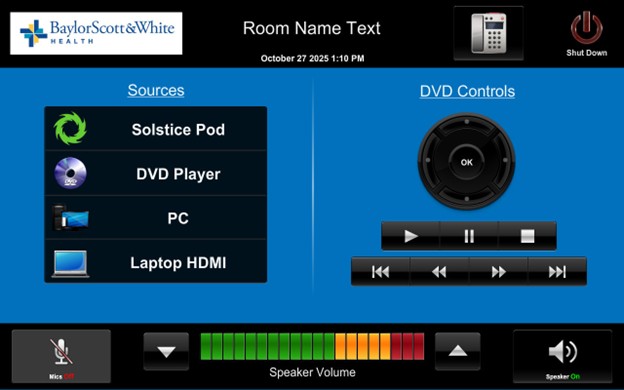
Source Selection (4 options):
Solstice Pod (Wireless Presentation)
DVD Player (in equipment rack)
PC (in equipment rack)
Laptop HDMI (wallplate below the touch panel in the main room)
The selected source shows on the projector.
Audio plays through speakers in both rooms when combined, or main room only when separated.
Bottom bar: Volume and Mic controls — these control all audio for both spaces.
Shutdown (top-right): opens system shutdown options.

Conductor Digital Instructions
DHWI Juanita Craft
RP016461
Divisible Room Touch Panel — Quick User Guide
Start & Sign-In
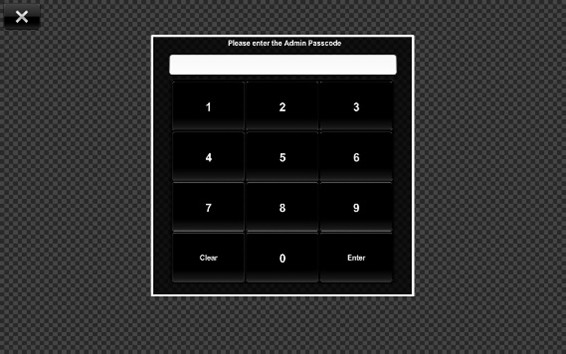
This is a divisible space. When the system is off the user will find the touch panel in each room on its default screen or “Start Page”. When they touch the screen to begin a passcode screen will pop up to ensure only authorized users can access the space.
Main Page Overview
Room Combine Behavior
When rooms are combined, video goes to the projector and audio plays in both rooms.
When rooms are separated, audio plays in the main room only.
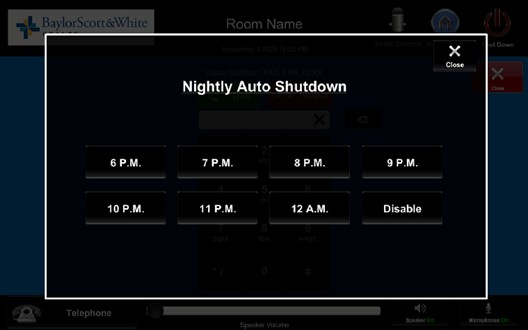
Admin Settings (Hold Logo)
Press and hold the Baylor Scott & White logo at the top of the main page to open Admin.
Reset the user access password
Set Nightly Auto Shutdown time
Room Combine Status:
Auto: follows the divisible wall sensor
Force Combined or Force Separate (manual override)
Shutdown
Tap Shutdown (top-right) and confirm to power the system off.