Conference room technology · self-service

Rooms that run themselves.

Conductor turns any conference room into a self-guiding space. One scan delivers step-by-step instructions, instant support, and real usage data — no app, no help-desk ticket, no “how do I connect?”


0
Apps to install
1 scan
To get a room running
24/7
Always-on support
The challenge

Every room has a learning curve. Conductor removes it.

01

Meetings start late

People walk in, can’t figure out the AV, and the first five minutes vanish into “can you see my screen?”

02

Help desk drowns in “how do I…”

The same connect-the-laptop tickets, room after room, week after week — IT firefighting instead of building.

03

You’re flying blind

No data on which rooms get used, what breaks, or where support is actually needed.

How it works

Scan. Guided. Supported. Measured.

Conductor lives where people already are — at the table, on the wall, on the screen. A single scan opens instructions written for that exact room.

Step 01 · Scan

One scan, zero apps

A user points their phone at the Conductor placard or on-screen splash. No download, no login — the room guide opens instantly in the browser.

01
02
Step 02 · Guide

Instructions for this room

Step-by-step directions for the actual hardware in front of them — start a call, share a screen, adjust audio. Plain language, no manual.

Step 03 · Support

Help is one tap away

Stuck? Conductor routes them straight to the right support contact — your AV team, help desk, or Taurus — with the room already identified.

03
04
Step 04 · Measure

Every scan is data

See which rooms get used, what people need help with, and where to invest next — usage tracking and reporting built in.

Capabilities

What Conductor delivers

A lightweight guidance, support, and analytics layer that sits on top of the conference room AV you already own.

01

Instant instructions

Room-specific, step-by-step guidance that anyone can follow on the first try. Update once, and every placard and splash screen reflects it.

02

One-tap support

Connect users to the right help instantly — with the room, device, and issue already in context. Fewer tickets, faster fixes.

03

Usage tracking & reporting

Every scan is a signal. See room utilization, support trends, and adoption — the data to justify and prioritize your AV spend.

04

Works with your existing AV

Cisco, Mersive, Logitech, Crestron, Zoom, Teams — Conductor is hardware-agnostic. No rip-and-replace, no new platform to run.

CiscoMersive SolsticeLogitechCrestronZoom RoomsMicrosoft TeamsBarcoPoly CiscoMersive SolsticeLogitechCrestronZoom RoomsMicrosoft TeamsBarcoPoly
Deployment

Put Conductor where people look

Two clean ways to bring the guide into the room — choose one or run both. Every entry point opens the same live, always-current guide.

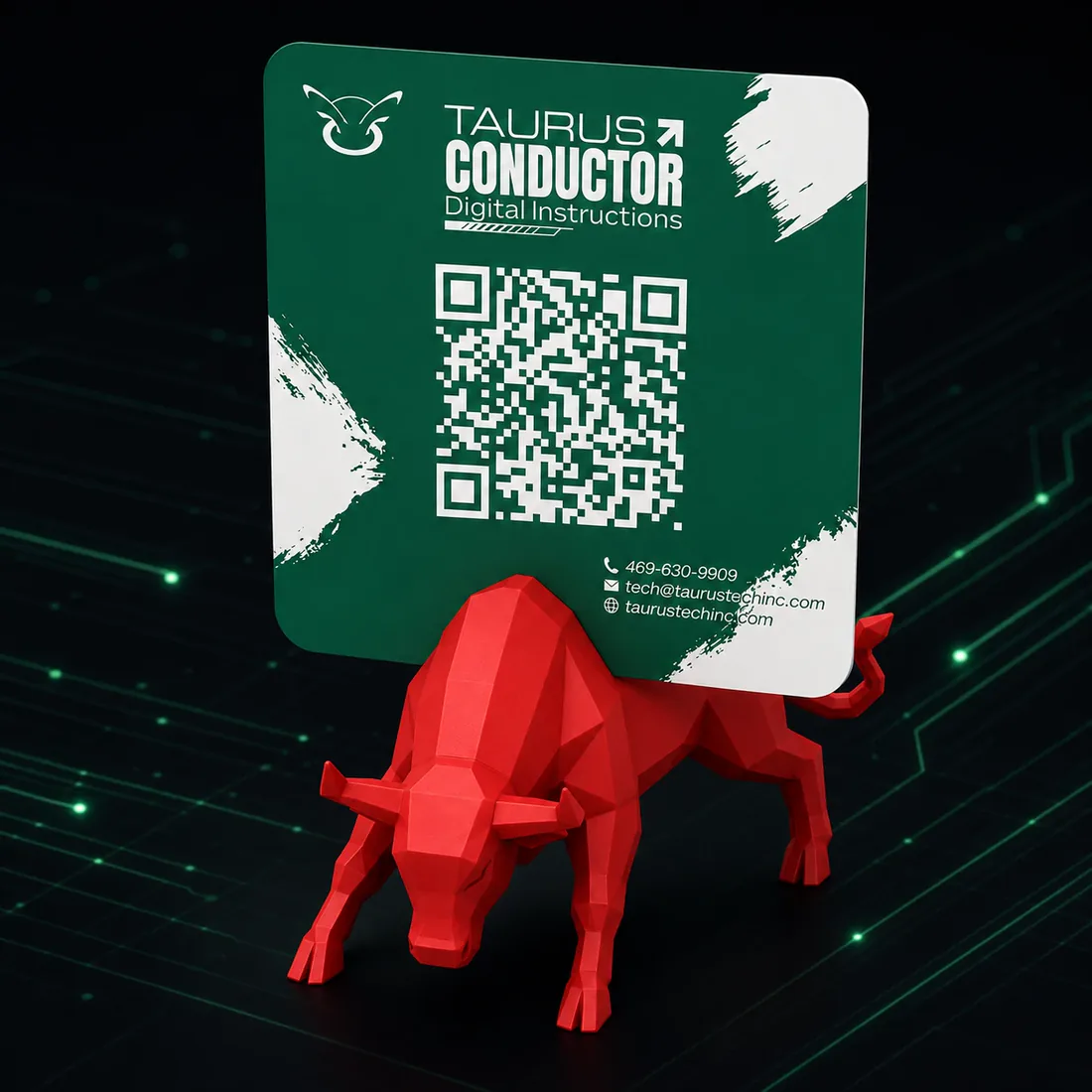
Taurus Conductor QR code placard for conference room digital instructions, mounted on a red low-poly bull stand
The Conductor placard — scan to begin
Method 01

Room placard

A branded, on-table or wall-mounted placard with the room’s QR code — like the one shown. Always visible, always in reach: the moment someone needs help, it’s right there.

Method 02

Display splash screen

The QR and guide appear right on the room’s idle display or digital signage. Zero hardware to add — it’s built into the screen already on the wall.

Who it’s for

One system. Any space with a learning curve.

If people use a space and sometimes need help using it, Conductor fits. Same engine, tuned to the room.

Corporate AV

Conference & huddle rooms that just work

Standardize the experience across every meeting space — from the executive boardroom to the two-person huddle room — so no one needs an AV degree to share a screen.

  • Cut “how do I connect?” help-desk tickets
  • Consistent guidance across every room type
  • Room utilization & support analytics
  • Works with Cisco, Logitech, Zoom & Teams
Healthcare

Guidance at the point of care

Help staff, patients, and families use the technology in a room — telehealth carts, in-room displays, controls — with clear, scannable instructions and direct support routing.

  • Self-service guidance for any room or device
  • Route to biomed / IT / facilities instantly
  • Reduce repeat support calls
  • Built on Taurus’ healthcare AV experience
Higher education

Every classroom, consistent

Faculty and guest lecturers walk into unfamiliar rooms constantly. Conductor gives them a scannable quick-start for that room’s projector, controls, and conferencing — and a fast line to support.

  • Quick-start for every classroom & lab
  • Fewer mid-class AV emergencies
  • Usage data across the campus
  • Update guides centrally, instantly
Hospitality & events

Self-service for every booking

Give event clients and guests a frictionless way to run the AV in your meeting and event spaces — without tying up your staff for every connection.

  • Guest-friendly, no-app guidance
  • Less staff time per room turnover
  • On-demand support routing
  • Reporting across all your spaces
Test drive

See a real Conductor guide

These are live demo rooms. Open one to experience exactly what a user sees the moment they scan.

Cisco Room Kit

Cowboys Room

Large conference room with a Cisco video bar and touch panel.

Open the guide
Mersive Solstice

Stars Room

Huddle room with wireless screen sharing via Solstice.

Open the guide
Cisco Navigator

Mavs Room

Boardroom with dual displays and a Navigator scheduler.

Open the guide
Why Taurus

Built by the team that builds the rooms

Conductor isn’t a generic QR app. It’s built by Taurus Technologies — AV and technology integrators who design, install, and support conference rooms, healthcare spaces, and command centers every day. We know what breaks and what people get stuck on, because we’re in the rooms.

Talk to our team
0%
Hardware-agnostic
0
Apps for users to install
0
Deploy & data built in*
Rooms, one dashboard
FAQ

Questions, answered

No. Conductor opens in the phone’s browser the instant a user scans the QR code. There’s nothing to install, no account to create, and no login — that’s the entire point. It works on any modern smartphone.

Yes. Conductor is hardware-agnostic — it’s a guidance, support, and analytics layer that sits on top of whatever you already run, including Cisco, Mersive Solstice, Logitech, Crestron, Zoom Rooms, and Microsoft Teams. There’s no rip-and-replace.

Two ways, used alone or together: a branded room placard with the QR, or a splash screen / digital signage on the room’s existing display. Both point to the same live guide, so any update appears everywhere at once.

Every scan is captured, so you can see room utilization, which guides and devices people need help with most, support requests, and adoption trends — the data you need to prioritize AV investment and prove its value.

No. The same engine powers healthcare spaces, classrooms and labs, and hospitality and event venues — anywhere people use a space and occasionally need help using it. The guidance is simply tuned to each room.

Get started

Make every room self-explanatory.

Book a 20-minute demo and we’ll walk through Conductor in your kind of room — or grab the whitepaper first.

See a live guide in your AV environment
No platform to rip out or replace
A plan for one room or one thousand
↓ Download the whitepaper
Book a demo

Let’s see it in your room

Request received

Thanks — a Taurus specialist will reach out within one business day to set up your demo.